I’ve been blogging since 2000. That’s an effing long time.
I exported the entire archive and asked Claude to help me build a tool to generate something similar.
Like Matt and others the arrival of Twitter and other microblogging made for a quiet era. The blog was rebuilt in 2024 thanks to Greg.
Clearly I’ve been posting more since then.
Cruftbox: My Box of Cruft
Archive analysis — 2000–2026
Cruftbox: My Box of Cruft has been publishing since 2000. Over 27 years, 1,762 posts have accumulated 365,517 words. The typical post runs just 119 words. At its most prolific, March 2003 brought 48 posts in a single month; recent years are quieter, but the archive has never gone fully dark.
1,762
Posts Published
27
Years Active
365,517
Words Written
207
Avg Words / Post
119
Typical Post Length
122
Posts w/ Video
Posts Per Year
Publishing peaked in 2002 with 335 posts and has settled to 23 in 2026. The early years dominate — see the golden era note below.
The Golden Era. March 2003 was the single busiest month — 48 posts in one month. The top 9 busiest calendar months are all from 2002–2003, which together account for 38% of the entire archive.
Average Post Length Per Year
Post length has never grown consistently — average post length has ranged from 18 words (2025) and 904 words (2016). Most years cluster between 60 and 150 words, reflecting an archive that has always leaned toward short-form writing.
Posts by Day of Week
Mon is the most active publishing day (303 posts); Sat the quietest (194). Weekdays average 258 posts each; weekends 234 — the gap is smaller than you might expect.
Time of Day
Two peaks dominate: 9pm (147 posts) and 9am (139 posts). The pattern points to writing before the workday or after it — the midday hours are notably quiet by comparison.
Most Prolific Weeks
The single busiest week was 2002-W19, with 17 posts in seven days. All 20 of the top 20 most prolific weeks fall before 2010 — that pace has never been matched since.
The Halloween Anchor
7 of the 10 longest posting silences ended in October or November. The blog may go quiet for months at a stretch, but Halloween reliably brings it back. The longest gap: 287 days from January 2019 to October 2019.
Days silent
Gap from
Resumed
287
Jan 2019
Oct 2019
← near Halloween
279
Jan 2014
Nov 2014
← near Halloween
256
Feb 2022
Oct 2022
← near Halloween
249
Jan 2015
Oct 2015
← near Halloween
232
Mar 2021
Oct 2021
← near Halloween
224
Nov 2019
Jun 2020
211
Jan 2024
Aug 2024
208
Aug 2020
Mar 2021
194
Apr 2023
Oct 2023
← near Halloween
179
May 2018
Oct 2018
← near Halloween
Embedded Videos
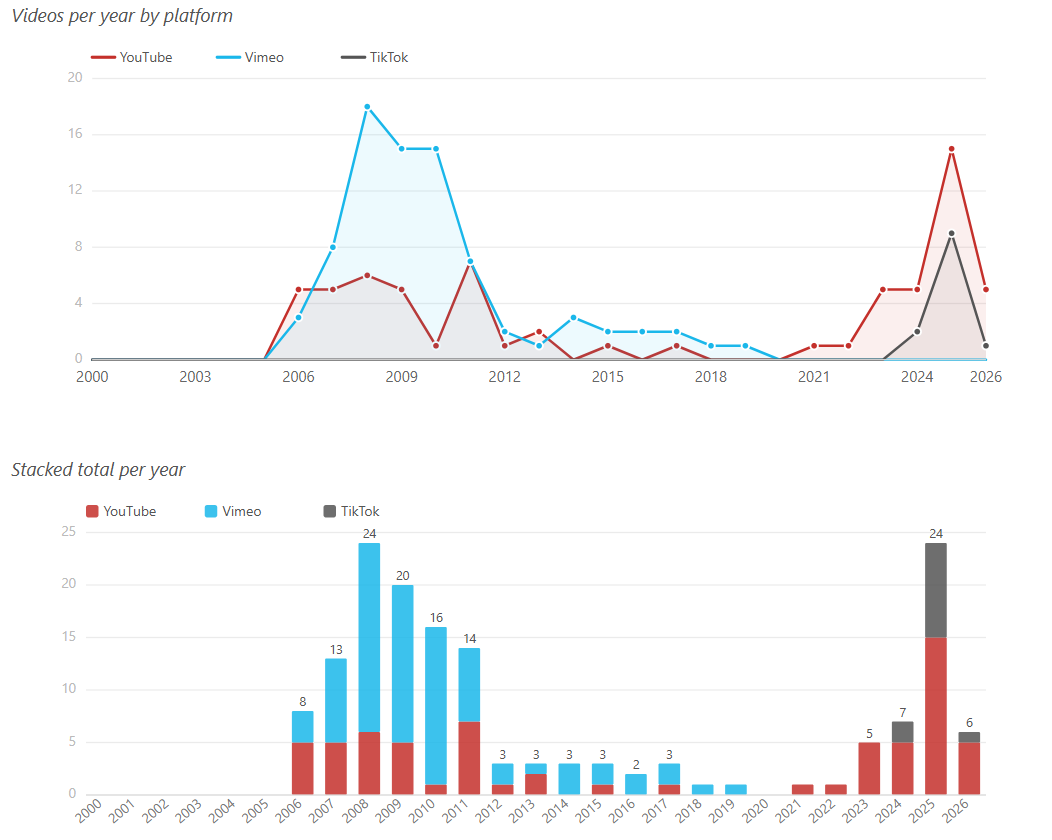
Vimeo leads with 80 videos across 122 posts, followed by YouTube (66). 2008 was the peak year for video embeds; TikTok shows up almost entirely in the most recent posts.
66
YouTube Videos
80
Vimeo Videos
12
TikTok Videos
158
Total Videos
Videos per year by platform
Stacked total per year
Top 10 Longest Posts
The longest post — “My Years as a Metaverse Warlord” (3,319 words, 2023) — stands well apart from the rest: the typical post here is just 119 words. Most long-form entries are annual reference posts or personal essays.
It’s a bit humbling to realize that twenty-seven years of my life can be distilled into a few hundred tokens and a series of vector embeddings. Claude managed to find ‘consistent themes of technical curiosity,’ which is a very polite way of saying I’ve been complaining about broken APIs and proprietary cables since the Clinton administration.
Twenty-seven years of blogging and my most consistent behavior is apparently disappearing every January and crawling back for Halloween like a vampire who forgot what month it was. At least I’m reliable about something.
With video now the dominant form on social media, a lot of my recent posts are just embeds of videos I’ve made. I do enjoy making videos. It’s powerful storytelling, which is a strange thing to say about a clip of me opening a beehive.
Looking ahead to the next quarter-century of Cruftbox, I’ll keep writing posts, even if they are basically just long tweets.
I saw the cheap corned beef at the supermarket and decided it was time to try again.
I keep my expectations low and it turned out better than I hoped. I think an actual meat slicer would help as I can’t really slice deli thin to get the right texture.
I was going to make a video of this, but the SD in the camera filled up five minutes in.
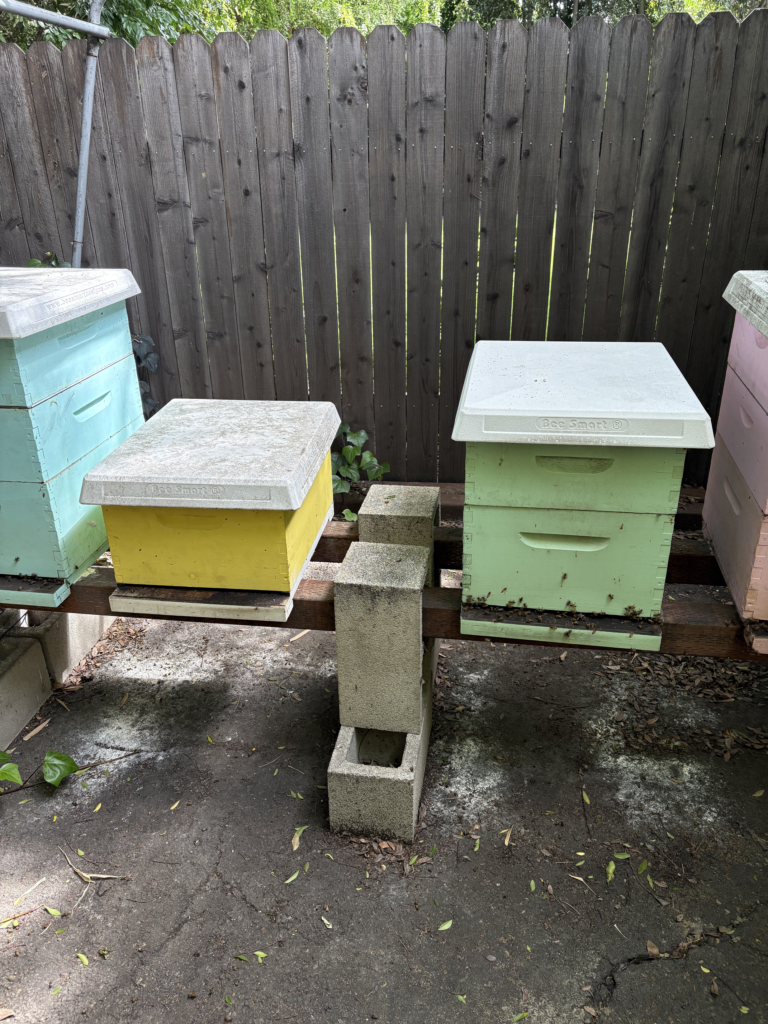
The Green Hive needed to be split. It was my last hive using two deep boxes and the frames inside were old and deep brown in color.
The hive had swarmed several weeks ago and there was a new feral queen inside. Lots of bees, but I didn’t want that feral queen to get started.
I picked up a couple of new VSH Pol-line 2.2 queens. They breed them up in San Luis Obispo.
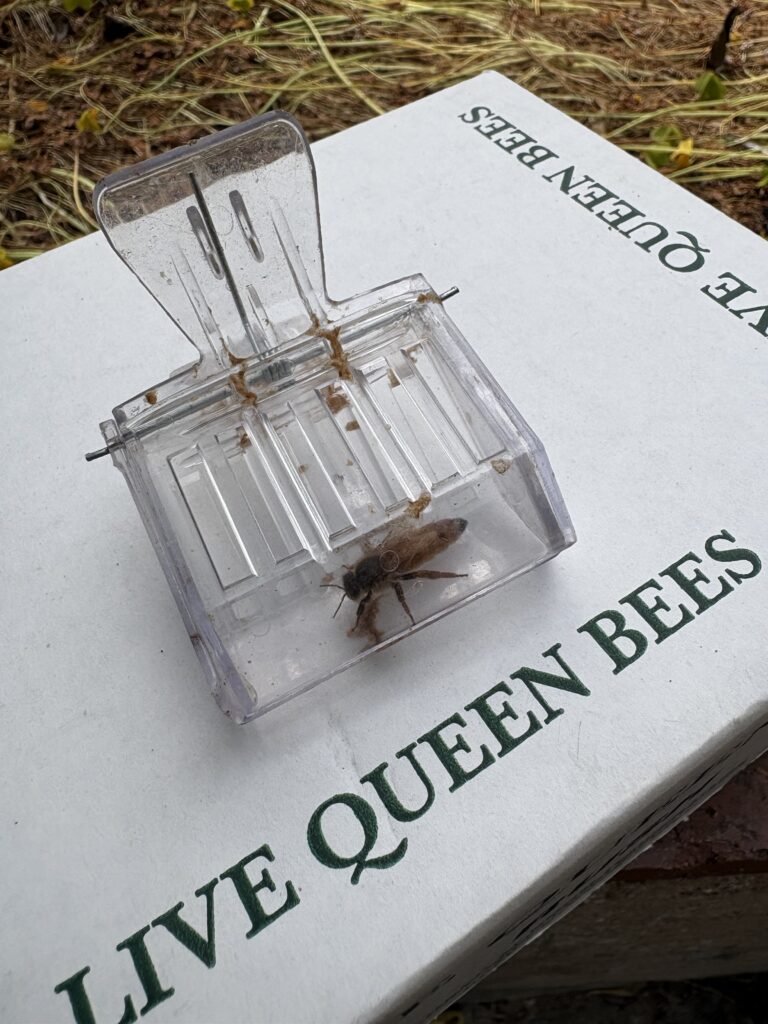
Took me a while going through the boxes, frame by frame, until I finally found the feral queen in the bottom box, trying to hide.
Once I had her in a clip, I was able to split up the frames and bees quickly.
I installed the two new queens and am hoping for the best. I might add a brood frame from the Pink & Green hives, but going to let the ladies settle a bit before I do that.
“A camel is a horse designed by committee.” – Sir Alec Issigonis
I am enamored by the idea of the smart home. Devices working to make life a little easier.
Over the last few years, I’ve been adding smart home devices to our home, mainly for simple purposes like turning the porch lights or Christmas lights on and off automatically. Nothing particularly complicated. For the most part, Amazon’s Alexa is up to the task to manage these things, despite the frustrating software interface. I can speak commands and it mostly works, hang ups typically being a need to reboot a smart switch.
We’ve replaced our old ceiling fans with new ones with LED lights and remote control that don’t wobble. Inexpensive and easy to install, the one drawback is that they don’t talk to any general smart home software. Alexa can’t control them, nor can Google Home or Apple Homekit. Not the end of the world, but a bit of a splinter in the mind for me.
Because I’m a nerd, I have been following podcast discussions about smart homes and how interoperability can be addressed. I’ve read about Matter (the new smart home protocol) and Thread (the new smart home networking method), but never dove into the details. My assumption was that the Connectivity Standards Alliance (CSA) who standardized Matter & Thread had done a good job and it simply would take time for actual products to catch up.
This was a poor assumption.
I’m an engineer. I don’t have qualms about dealing with networking issues, configuring software, and reading the instructions.
Optimistically, I started looking into how I might control the ceiling fans with Alexa.
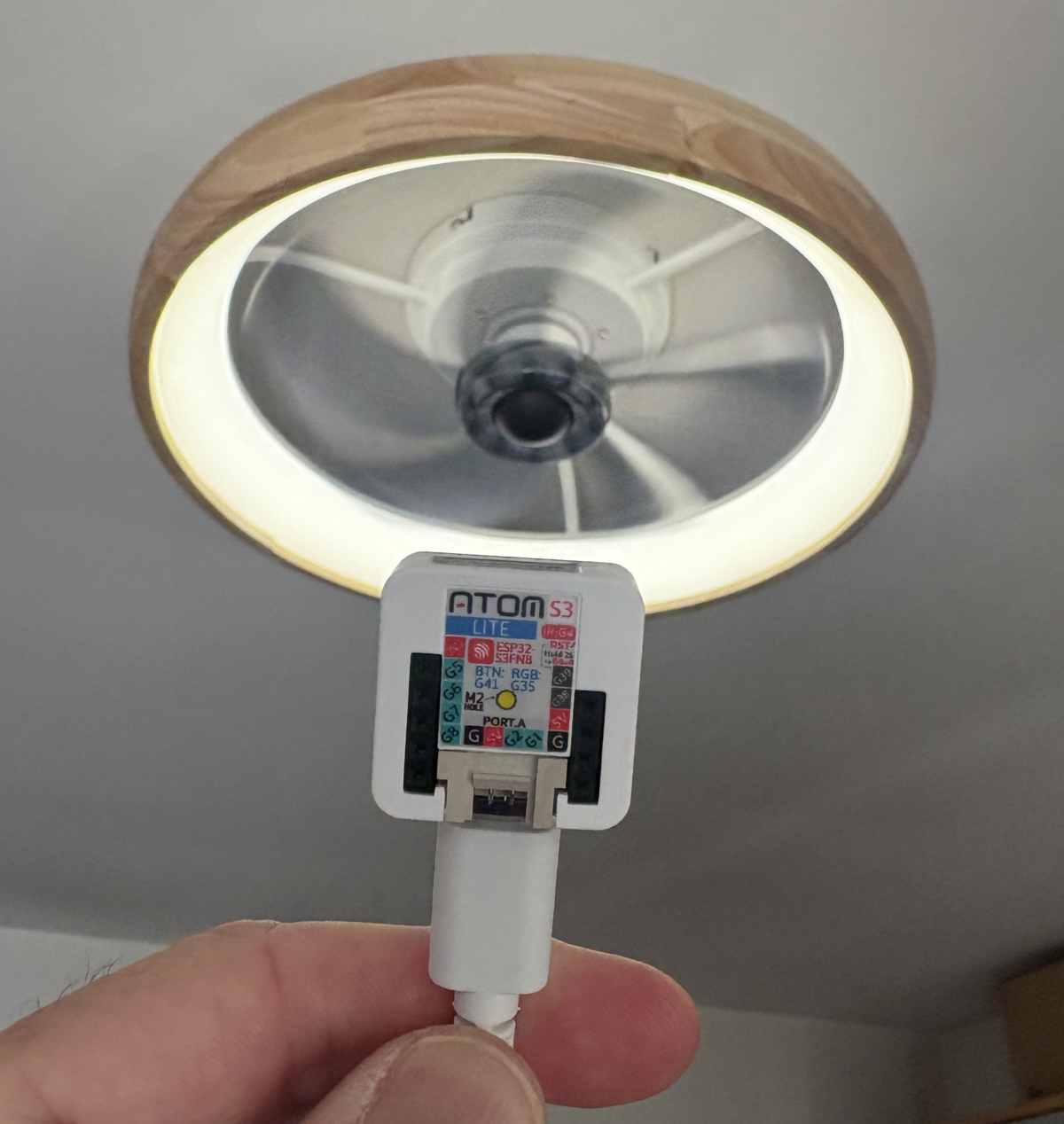
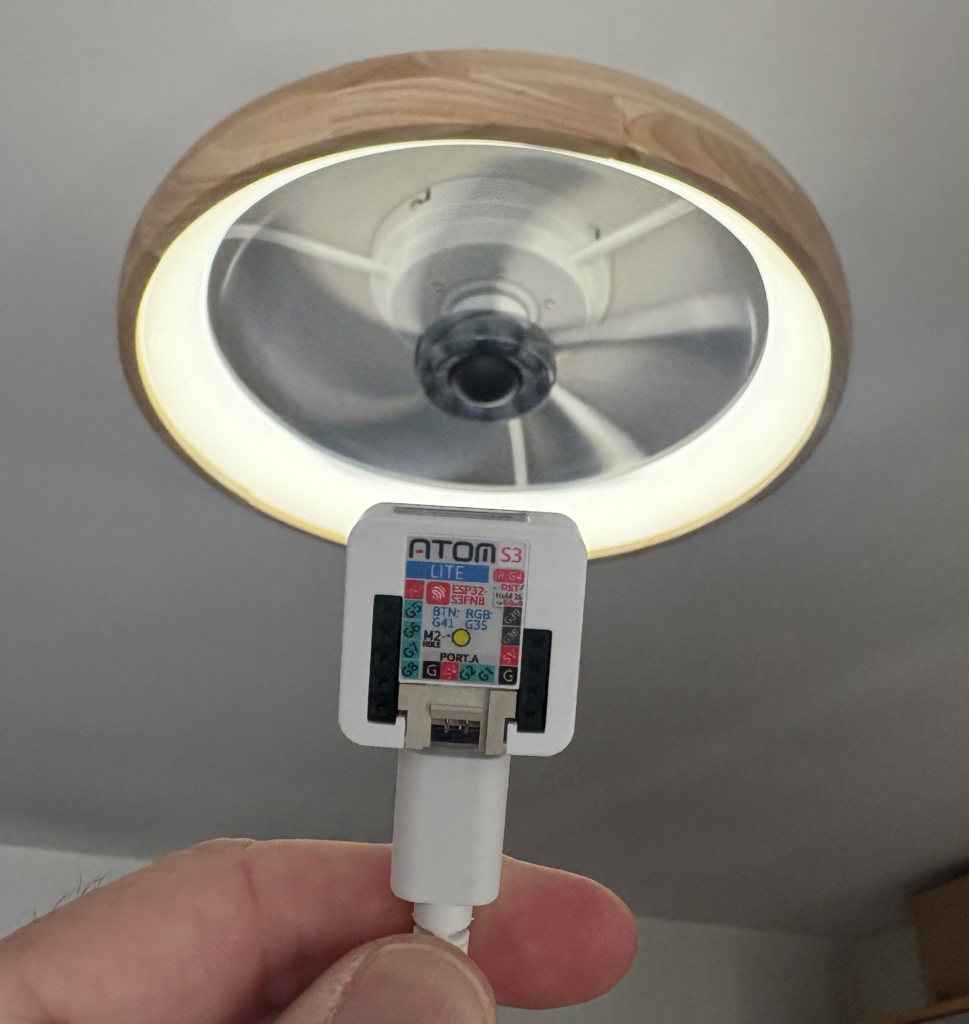
No easy path, but there was a slightly twisty one. There are small Bluetooth proxy devices, like the M5Stack ATOMS3, that can emulate the commands used to control the fans.
An AtomS3 Bluetooth proxy
Unfortunately, Alexa won’t talk directly to the Bluetooth proxy, but open source software called Home Assistant can.
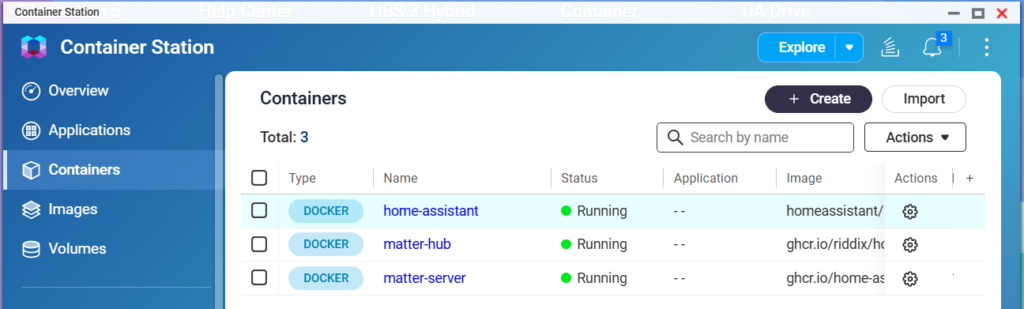
Undaunted, I set up Docker containers to run Home Assistant on our home NAS server and the bridge that allowed it to talk to Alexa. No simple task, I was grateful to Claude to help me through the configuration steps. Home Assistant is unfortunately a bit user hostile and not for the weak of heart. If words like ‘container’, ‘Docker’, or ‘command line’ are unfamiliar to you, do not try using Home Assistant.
The Bluetooth emulation works and saying the specific incantation to Alexa does indeed turn the ceiling fan and light on and off. I take this as a good sign as to the state of smart homes.
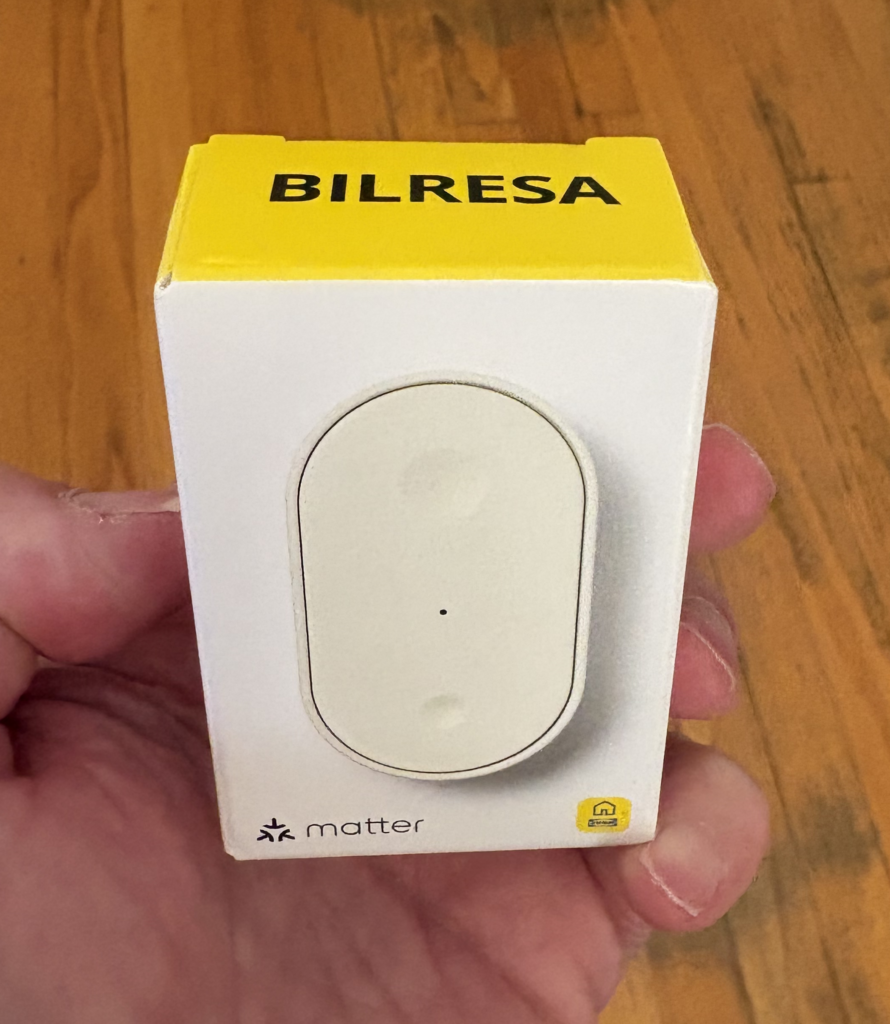
Emboldened, I started thinking about trying the new smart home devices from Ikea. They are super cheap and say they work with Matter & Thread. The $6 smart button seemed like a great deal to control a lamp I had built that ran off a smart plug.
An Ikea Bilresa smart button
I followed the instructions, using the Alexa app, with no luck. It just went in circles. Wouldn’t join the device.
Optimistically, I went into Home Assistant to add the button. No luck. The same kind of endless loop.
Frustrated, I finally read up on the technical underpinnings of Matter & Thread, and to my horror, saw the disaster the CSA had created.
As an engineer, I understand the urge to build things with elegance and correctness. But the world is rarely an elegant place. I learned the hard way that the best is the enemy of the good.
The CSA tried to be smart, elegant, and correct to the detriment of anyone actually trying to use Matter & Thread.
To be clear, many of these issues are implementation problems rather than flaws in the underlying specs, but for users, that distinction doesn’t matter.
IMHO, there are three major failures of the design. They are ‘one-time’ QR code use, IPv6 for Thread, and Bluetooth commissioning.
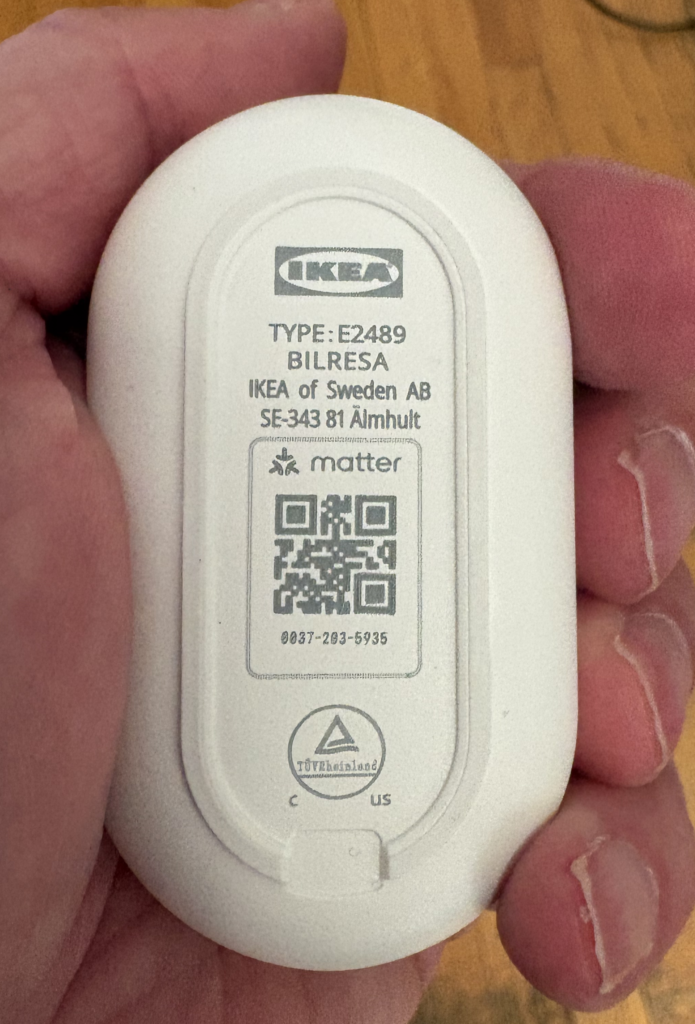
‘one-time’ QR code use – In the quest for ultimate security, the QR codes printed on Matter devices can only be used basically one time. Well, technically they aren’t one-time use, but effectively one-time use in practice due to fragile commissioning flows. If something goes awry during the first use, the QR code might as well be invalid.
The use of a one-time cryptographic key may be great for spy tradecraft, but for the average person it is maddening. In theory you can do a factory reset, and try again, but this is nonsense for the average person. They will just assume the device is defective.
Heaven help you if the QR code gets lost or is unreadable. If the code is lost and the device isn’t already paired, it is permanently bricked.
Don’t get me started on the tiny font size
IPv6 for Thread – The Thread networking stack will only run on IPv6. IPv6 is the next generation of how computers and electronic devices identify themselves to each other. It’s exceedingly complex, obtuse to even most technical folks that don’t do network sysadmin on a daily basis. Great in theory, but doesn’t account for the fact that not everything running in people’s homes are configured to run IPv6.
The spec assumes a ‘flat’ network where every device has a seat at the table, ignoring many of us early adopters running containerized environments where ‘Network Address Translation’ (NAT) is a hard wall that Matter simply cannot climb. Even in my case, running Home Assistant in a Docker Container on a NAS server is broken as the firmware doesn’t allow IPv6 traffic to the containers. Swapping my NAS out to make the Ikea button work is not really an option.
A user shouldn’t need to understand Prefix Delegation or SLAAC just to install a $6 button. IPv6 is great in concept, but no one is running out of IPv4 addresses in their home. Without even a fallback method to use IPv4, this is a bit of an overreach. Thread runs on IPv6 internally, but it’s supposed to be abstracted away from the user.
The CSA spec assumed a well-functioning Thread Border Router ecosystem that doesn’t exist yet. In a normal home setup, you shouldn’t need to know, or care, that IPv6 is even involved. Imagine your non-technical friends and family trying to set up IPv6 over the phone with their local ISP.
Bluetooth commissioning – Despite all of the CSA’s forward looking decisions, they amazingly decided that the only way to actually commission and activate a Matter device was to use Bluetooth (BLE standardized in 2010) to do this final step and join the device to the Thread network.
The use of Bluetooth is intended to ensure physical proximity, a ‘digital leash’ to prevent remote attacks. But in reality, Bluetooth is slow and hinky. The cryptographic ‘handshake’ required by Matter can take up to a minute, which in modern UX design is an eternity. If a user navigates away or their phone screen locks, the Bluetooth connection snaps, the link dies, and the device enters a zombie state that only a factory reset can fix.
We are using a protocol standardized in 2010 to secure a future that hasn’t arrived yet.
In theory the phone is the optimal device for this, but in reality, no one wants to stare at a spinning icon. While existing smart home hubs may have Matter & Thread enabled, only the very latest models have Bluetooth as well.
Amazon claims they have millions of Matter-ready devices, but they don’t mention that most of them are deaf to new devices. While most Alexa devices have Bluetooth for music, only the very latest models have the ‘Matter Commissioner’ software enabled to use that radio for setup. Eero routers have Bluetooth, but only to talk to other Eero devices, not Matter devices. Ironically, Eero is a Thread Border Router, but unable to commission Matter devices onto Thread.
Taken individually, these design failures can be worked around by the tech savvy, but the combination of all three creates an almost impenetrable smart home fortress, one that you can’t add devices easily. Yes, it’s quite secure, but you can’t do much with it.
Some reading this may take issue and respond with anecdotes about how it’s easier with their preferred smart home hub system, or that they have never encountered issues, or that I just need a Zigbee bridge. This fallacy doesn’t hold up when looking at the abysmally high failure rates of Matter device commissioning.
Hope on the horizon?
The CSA has been forced to recognize these issues and is planning some improvement. The ‘one-time’ QR code and Bluetooth need looks to be replaced by NFC onboarding (think of it like ‘tap to pay’ tech). The standard for NFC is finally set, the phone in your pocket already has NFC, but most smart home devices don’t include the NFC chips to support it yet. An improved Thread router specification will allow Thread to talk to IPv4 devices in your home.
This is hopeful, but for people buying Matter devices now, they are buying devices that will be permanently orphaned in the future, unable to meet the new, upcoming standards.
Standards work is long, boring, and frustrating. I’ve spent days in those meeting rooms arguing about Java usefulness, video format frame rates, ECMAScript use in ATSC standards, and other boring technical topics. I get it that the CSA meant well, but they lost sight of the target, which is simplified installs for the average person at home.
I’ll end my rant here.
Unrelated, does anyone want a couple free Bilresa buttons?
I was learning about MCP servers and wanted to try using one to order a pizza. Not really doable today.
MCP (Model Context Protocol) is an open standard for how AI models connect with real-world services and APIs.
In practice, what I saw was various ways to get access to systems with undocumented APIs since MCP is still taking baby steps.
That led me down a rabbit hole of how messy real-world integrations still are. Most useful systems don’t have clean, open interfaces yet.
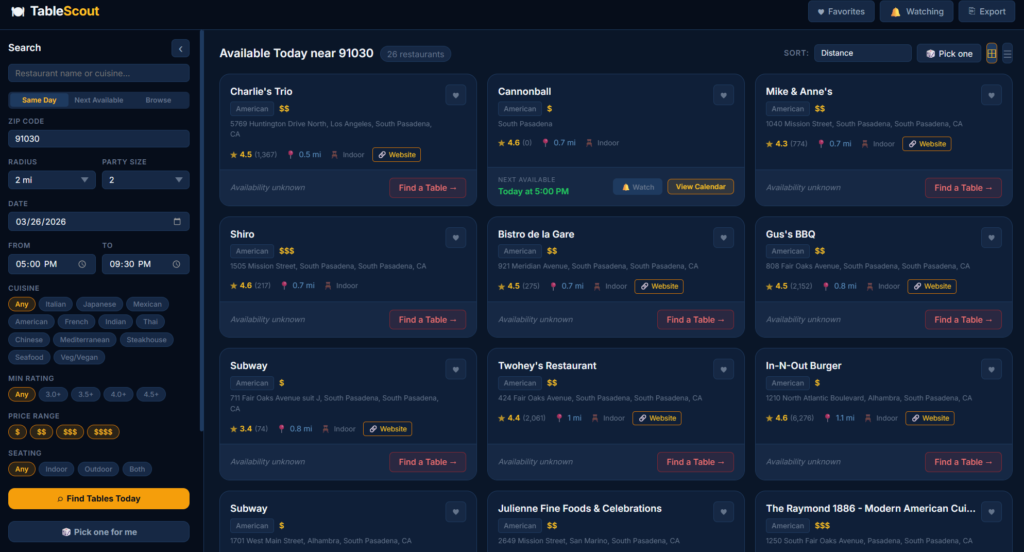
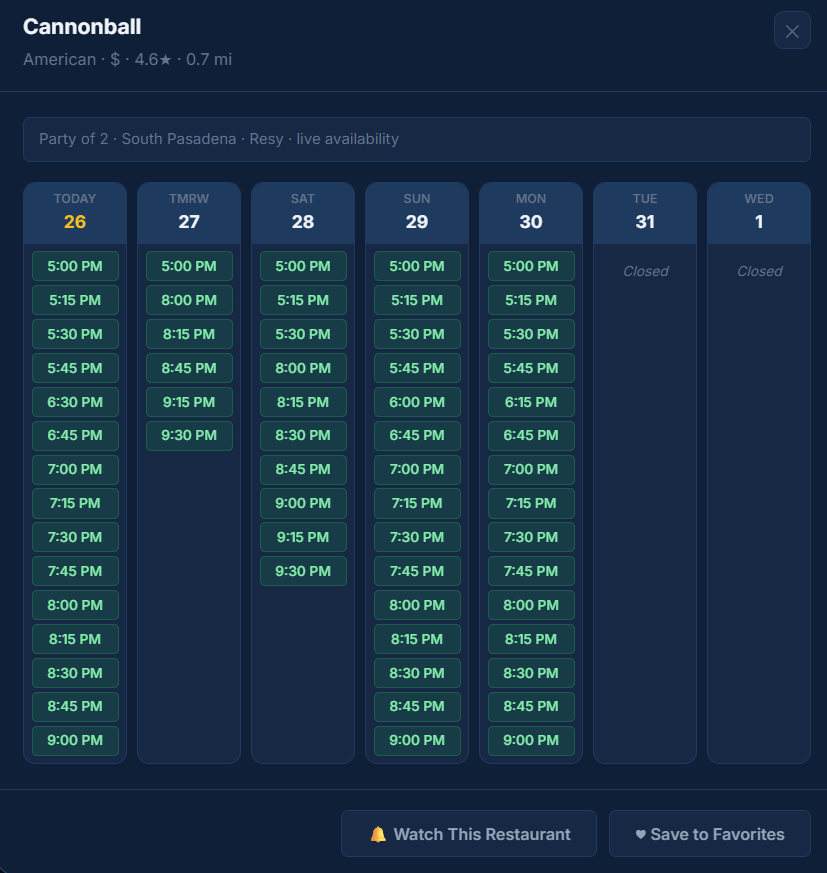
I’ve never liked the various pages for finding restaurants and making reservations. Too cluttered and confusing. So I decided to build my own interface.
There are ways to get API access to Resy and OpenTable, so I got to work. I thought a bit about the search criteria and spun up Claude Code.
Getting access to Resy wasn’t that hard. I had to grab some tokens from the browser inspector but that’s it.
OpenTable was a different beast. I got initial access working, but within minutes OpenTable’s anti-bot system flagged the traffic and shut me out. Dead end.
Rather than fight the anti-bot system, I pivoted to Google Places for broader coverage. Getting a Google Maps key was simple and free.
The app de-dupes the results. I assumed the de-dup would be hard, but Claude one-shot it.
With a little massaging of the UX/UI, I was getting good results.
No ads. No sponsored pushes. Nothing unneeded.
For restaurants on Resy, I can see when they have open slots and if I select one, it takes me to the Resy page ready to click.
If they aren’t on Resy, it opens the restaurant website.
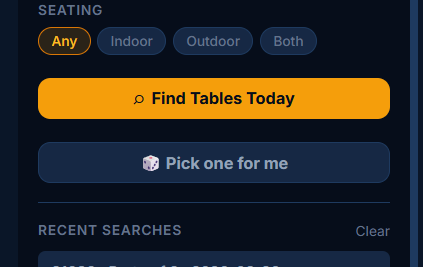
My wife requested a ‘pick one for me’ option for when we are undecided. The app then uses RNG to choose a restaurant from our criteria.
Did the whole thing in a couple hours.
Currently AI agents and homebrewed apps like mine are extremely fragile solutions prone to breakage.
If businesses start supporting real APIs or MCP servers, the opportunity for better interfaces explodes.
Right now, the best interfaces are still built despite platforms, not because of them.
I called it table-scout and it’s up on GitHub as cruftbox/table-scout if you want to take a look.