The sad state of smart homes

“A camel is a horse designed by committee.” – Sir Alec Issigonis

I am enamored by the idea of the smart home. Devices working to make life a little easier.

Over the last few years, I’ve been adding smart home devices to our home, mainly for simple purposes like turning the porch lights or Christmas lights on and off automatically. Nothing particularly complicated. For the most part, Amazon’s Alexa is up to the task to manage these things, despite the frustrating software interface. I can speak commands and it mostly works, hang ups typically being a need to reboot a smart switch.

We’ve replaced our old ceiling fans with new ones with LED lights and remote control that don’t wobble. Inexpensive and easy to install, the one drawback is that they don’t talk to any general smart home software. Alexa can’t control them, nor can Google Home or Apple Homekit. Not the end of the world, but a bit of a splinter in the mind for me.

Because I’m a nerd, I have been following podcast discussions about smart homes and how interoperability can be addressed. I’ve read about Matter (the new smart home protocol) and Thread (the new smart home networking method), but never dove into the details. My assumption was that the Connectivity Standards Alliance (CSA) who standardized Matter & Thread had done a good job and it simply would take time for actual products to catch up.

This was a poor assumption.

I’m an engineer. I don’t have qualms about dealing with networking issues, configuring software, and reading the instructions.

Optimistically, I started looking into how I might control the ceiling fans with Alexa.

No easy path, but there was a slightly twisty one. There are small Bluetooth proxy devices, like the M5Stack ATOMS3, that can emulate the commands used to control the fans.


Unfortunately, Alexa won’t talk directly to the Bluetooth proxy, but open source software called Home Assistant can.

Undaunted, I set up Docker containers to run Home Assistant on our home NAS server and the bridge that allowed it to talk to Alexa. No simple task, I was grateful to Claude to help me through the configuration steps. Home Assistant is unfortunately a bit user hostile and not for the weak of heart. If words like ‘container’, ‘Docker’, or ‘command line’ are unfamiliar to you, do not try using Home Assistant.


The Bluetooth emulation works and saying the specific incantation to Alexa does indeed turn the ceiling fan and light on and off. I take this as a good sign as to the state of smart homes.

Emboldened, I started thinking about trying the new smart home devices from Ikea. They are super cheap and say they work with Matter & Thread. The $6 smart button seemed like a great deal to control a lamp I had built that ran off a smart plug.

I followed the instructions, using the Alexa app, with no luck. It just went in circles. Wouldn’t join the device.

Optimistically, I went into Home Assistant to add the button. No luck. The same kind of endless loop.

Frustrated, I finally read up on the technical underpinnings of Matter & Thread, and to my horror, saw the disaster the CSA had created.

As an engineer, I understand the urge to build things with elegance and correctness. But the world is rarely an elegant place. I learned the hard way that the best is the enemy of the good.

The CSA tried to be smart, elegant, and correct to the detriment of anyone actually trying to use Matter & Thread.

To be clear, many of these issues are implementation problems rather than flaws in the underlying specs, but for users, that distinction doesn’t matter.

IMHO, there are three major failures of the design. They are ‘one-time’ QR code use, IPv6 for Thread, and Bluetooth commissioning.

‘one-time’ QR code use – In the quest for ultimate security, the QR codes printed on Matter devices can only be used basically one time. Well, technically they aren’t one-time use, but effectively one-time use in practice due to fragile commissioning flows. If something goes awry during the first use, the QR code might as well be invalid.

The use of a one-time cryptographic key may be great for spy tradecraft, but for the average person it is maddening. In theory you can do a factory reset, and try again, but this is nonsense for the average person. They will just assume the device is defective.

Heaven help you if the QR code gets lost or is unreadable. If the code is lost and the device isn’t already paired, it is permanently bricked.


IPv6 for Thread – The Thread networking stack will only run on IPv6. IPv6 is the next generation of how computers and electronic devices identify themselves to each other. It’s exceedingly complex, obtuse to even most technical folks that don’t do network sysadmin on a daily basis. Great in theory, but doesn’t account for the fact that not everything running in people’s homes are configured to run IPv6.

The spec assumes a ‘flat’ network where every device has a seat at the table, ignoring many of us early adopters running containerized environments where ‘Network Address Translation’ (NAT) is a hard wall that Matter simply cannot climb. Even in my case, running Home Assistant in a Docker Container on a NAS server is broken as the firmware doesn’t allow IPv6 traffic to the containers. Swapping my NAS out to make the Ikea button work is not really an option.

A user shouldn’t need to understand Prefix Delegation or SLAAC just to install a $6 button. IPv6 is great in concept, but no one is running out of IPv4 addresses in their home. Without even a fallback method to use IPv4, this is a bit of an overreach. Thread runs on IPv6 internally, but it’s supposed to be abstracted away from the user.

The CSA spec assumed a well-functioning Thread Border Router ecosystem that doesn’t exist yet. In a normal home setup, you shouldn’t need to know, or care, that IPv6 is even involved. Imagine your non-technical friends and family trying to set up IPv6 over the phone with their local ISP.

Bluetooth commissioning – Despite all of the CSA’s forward looking decisions, they amazingly decided that the only way to actually commission and activate a Matter device was to use Bluetooth (BLE standardized in 2010) to do this final step and join the device to the Thread network.

The use of Bluetooth is intended to ensure physical proximity, a ‘digital leash’ to prevent remote attacks. But in reality, Bluetooth is slow and hinky. The cryptographic ‘handshake’ required by Matter can take up to a minute, which in modern UX design is an eternity. If a user navigates away or their phone screen locks, the Bluetooth connection snaps, the link dies, and the device enters a zombie state that only a factory reset can fix.

We are using a protocol standardized in 2010 to secure a future that hasn’t arrived yet.

In theory the phone is the optimal device for this, but in reality, no one wants to stare at a spinning icon. While existing smart home hubs may have Matter & Thread enabled, only the very latest models have Bluetooth as well.

Amazon claims they have millions of Matter-ready devices, but they don’t mention that most of them are deaf to new devices. While most Alexa devices have Bluetooth for music, only the very latest models have the ‘Matter Commissioner’ software enabled to use that radio for setup. Eero routers have Bluetooth, but only to talk to other Eero devices, not Matter devices. Ironically, Eero is a Thread Border Router, but unable to commission Matter devices onto Thread.

A man in a blue shirt expressing exasperation and face palming.


Taken individually, these design failures can be worked around by the tech savvy, but the combination of all three creates an almost impenetrable smart home fortress, one that you can’t add devices easily. Yes, it’s quite secure, but you can’t do much with it.

Some reading this may take issue and respond with anecdotes about how it’s easier with their preferred smart home hub system, or that they have never encountered issues, or that I just need a Zigbee bridge. This fallacy doesn’t hold up when looking at the abysmally high failure rates of Matter device commissioning.

Hope on the horizon?


The CSA has been forced to recognize these issues and is planning some improvement. The ‘one-time’ QR code and Bluetooth need looks to be replaced by NFC onboarding (think of it like ‘tap to pay’ tech). The standard for NFC is finally set, the phone in your pocket already has NFC, but most smart home devices don’t include the NFC chips to support it yet. An improved Thread router specification will allow Thread to talk to IPv4 devices in your home.

This is hopeful, but for people buying Matter devices now, they are buying devices that will be permanently orphaned in the future, unable to meet the new, upcoming standards.

Standards work is long, boring, and frustrating. I’ve spent days in those meeting rooms arguing about Java usefulness, video format frame rates, ECMAScript use in ATSC standards, and other boring technical topics. I get it that the CSA meant well, but they lost sight of the target, which is simplified installs for the average person at home.

I’ll end my rant here.

Unrelated, does anyone want a couple free Bilresa buttons?

table-scout – a homebrewed restaurant finder

I was learning about MCP servers and wanted to try using one to order a pizza. Not really doable today.

MCP (Model Context Protocol) is an open standard for how AI models connect with real-world services and APIs.

In practice, what I saw was various ways to get access to systems with undocumented APIs since MCP is still taking baby steps.

That led me down a rabbit hole of how messy real-world integrations still are. Most useful systems don’t have clean, open interfaces yet.

I’ve never liked the various pages for finding restaurants and making reservations. Too cluttered and confusing. So I decided to build my own interface.


There are ways to get API access to Resy and OpenTable, so I got to work. I thought a bit about the search criteria and spun up Claude Code.

Getting access to Resy wasn’t that hard. I had to grab some tokens from the browser inspector but that’s it.

OpenTable was a different beast. I got initial access working, but within minutes OpenTable’s anti-bot system flagged the traffic and shut me out. Dead end.

Rather than fight the anti-bot system, I pivoted to Google Places for broader coverage. Getting a Google Maps key was simple and free.

The app de-dupes the results. I assumed the de-dup would be hard, but Claude one-shot it.

With a little massaging of the UX/UI, I was getting good results.

No ads.
No sponsored pushes.
Nothing unneeded.


For restaurants on Resy, I can see when they have open slots and if I select one, it takes me to the Resy page ready to click.


If they aren’t on Resy, it opens the restaurant website.

My wife requested a ‘pick one for me’ option for when we are undecided. The app then uses RNG to choose a restaurant from our criteria.


Did the whole thing in a couple hours.

Currently AI agents and homebrewed apps like mine are extremely fragile solutions prone to breakage.

If businesses start supporting real APIs or MCP servers, the opportunity for better interfaces explodes.

Right now, the best interfaces are still built despite platforms, not because of them.

I called it table-scout and it’s up on GitHub as cruftbox/table-scout if you want to take a look.

The WWI Biplane Era of Enterprise AI

Most of the conversation about AI in business is coming from people selling it; pundits, software developers, and venture capitalists pushing the hype cycle. Very little is coming from people who have to make it work and actually support businesses with technology.

(An obviously AI generated image)

As someone that has been providing technology systems to my business counterparts in Fortune 50 companies for 20+ years, I know a bit about how technology does and doesn’t work within corporate environments.

In 2018, my team installed our first AI system. We were using machine learning to identify actors’ faces, create transcripts, and identify text and objects in video files from television shows in production. This allowed creative teams to find scenes quickly and easily, speeding up the editing process and avoiding the drudgery of “logging tape”.

Over the last few years, I’ve followed the remarkable advances in LLMs, the “generative” tools under the AI moniker.  I learned a lot about what they can and can’t do. 

One caveat: software development is changing much faster than everything else. My thoughts apply to the rest of a modern enterprise.

Here are my three key takeaway points:

Agents are in a nascent stage and can’t replace people

LLMs make mistakes regularly

AI costs are subsidized now, but won’t be forever

These aren’t abstract concerns. Each one has real consequences for how you deploy AI inside a company.

Agents are in a nascent stage and can’t replace people

The recent advances in agent capabilities are inspiring.  Headlines are dominated by OpenClaw and NemoClaw, the current hot autonomous agent frameworks. Neither of which are AI themselves, making it easy to confuse these agents with LLMs.

The big idea being discussed is replacing roles with AI.  I mean if OpenClaw seems to read, think, and respond to emails, why can’t it replace people?

We are seeing a lot of ‘AI washing’ right now with layoffs, but those layoffs aren’t really about replacing people with AI, they are about making Wall Street analysts happy.

The difficulty is that the idea of an AI CFO or AI travel person is not a true AI or agent.  There isn’t really a piece of AI software that is running 24/7 thinking about CFO issues.  An “AI CFO” isn’t a sentient agent, it’s just a static prompt rerun each time, with no memory or context beyond that single interaction. It’s not a little computer homunculus waiting to leap into action.

An AI corporate person would require a triggering system of sorts, a database or jumble of JSON files that store everything it needs to know, and some kind of boundary on what it’s supposed to look at to have a reasonable context window.  You simply cannot make an LLM look at all the information of a business every time it’s invoked.

There is a hazy future of ideas that help with these kind of things to create some sort of standardized framework, but that does not exist right now. There are no gold standard best practices. We are at the “throw stuff at the wall and see what sticks” phase right now.

LLMs make mistakes regularly

It’s often said that LLMs can have hallucinations.  I prefer to call them what they are, mistakes.  LLMs are incredibly complex systems, but at the highest level they are very good guessing machines, basing their guesses on their training. Even though they are extremely good, they are not perfect.

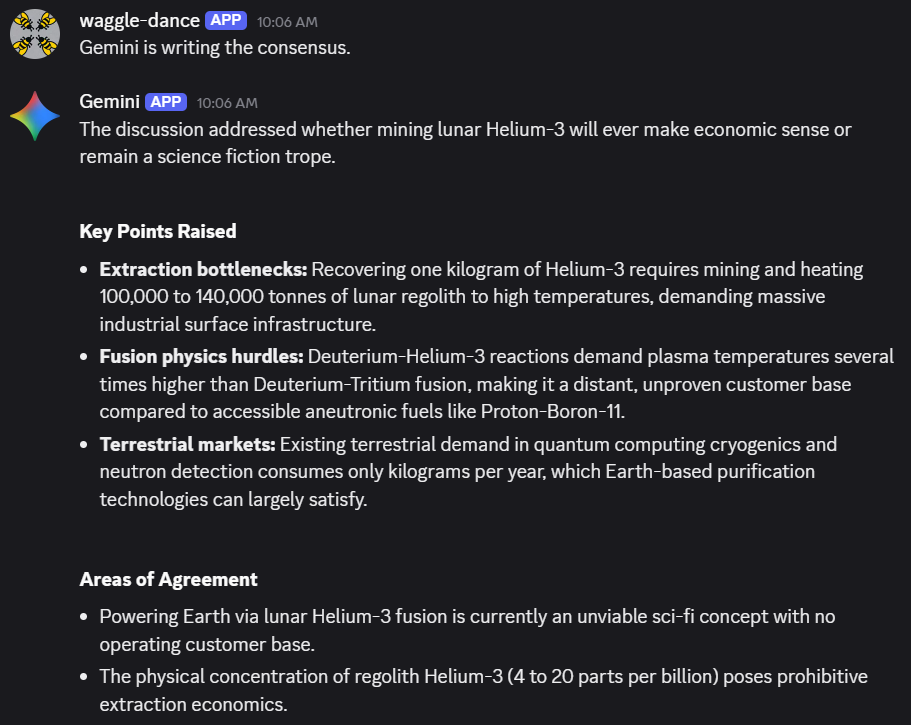
LLMs are not deterministic systems. They are probabilistic outputs wrapped in confident language. For this reason, I built my llm-discussion app, that has three different AI models debate and come to consensus on a question.  Relying on a single LLM’s answer as the gospel every time is a recipe for problems.

The fallout from a miscalculated quarterly report due to an AI hallucination can have a huge negative impact on a company, causing long lasting harm.

In the corporate world, mistakes are real problems.  Financial spreadsheets need to be 100% correct.  Presentations can’t have misspellings or incorrect logos. 

AI costs are subsidized now, but won’t be forever

At the core of any LLM usage are tokens.  You can think of tokens like counting each word in an email and charging per word.  Buying access to the frontier LLMs is basically buying tokens to use.

Processing these tokens is what all these gigantic data centers are designed to do.  Spending hundreds of billions in infrastructure is hugely expensive. That has to be paid for somehow.

The truth of the matter is that the current cost of tokens does not reflect the actual cost of processing the tokens. In other words, AI companies lose money on every single interaction.

Currently, all costs of using AI are subsidized and do not reflect their true costs. The true costs are being paid with venture capital money and money from adjacent lines of business. For example, profit from Google Search pays for Gemini and profit from Microsoft Azure pays for Copilot.

At some point the AI business has to make enough money to be profitable, that means costs will rise.

We’ve seen this business cycle play out before. This follows a pattern Cory Doctorow describes as ‘enshittification.’ In that framing, we’re still in stage one.

Money is what corporate IT divisions are most concerned with. Yes, they have a nice PowerPoint about ‘value add’ and ROI, but their main role is cost containment. The slog into process heavy ITIL processes and standardization is all about saving money.  IT groups will deploy a crappy $9 mouse instead of a nicer $30 mouse to save money.  They’ll switch from Slack to the inferior Microsoft Teams to save money without hesitation. The user comes last in most of these calculations.

IT managers face a real dilemma when implementing AI tools.  Currently, they can put in AI tools provided via a SaaS implementation that are pay by the seat, all you can drink situations.  But those arrangements simply will not last.  The current subsidized situation is untenable and eventually companies will need token budgets and a way for staff to use those tokens.

Can you imagine the department that stresses over the cost of a mouse, seeing the token bills skyrocketing up when a creative team starts making hundreds of image generation requests in an afternoon.  Or that a single employee could accidentally rack up a $5,000 bill just by asking an LLM to “analyze these 500 PDFs” is a nightmare scenario for ITIL-focused managers. There will be aneurysms.

AI optimists will point out that token prices are plummeting, and they aren’t wrong. Cheap tokens during the land-grab phase are exactly how the “subsidized” playbook works. But in the enterprise, the Jevons Paradox usually wins: as a resource gets cheaper, we don’t save money, we find more ways to consume it. A 90% drop in token price doesn’t matter if your workforce increases usage by orders of magnitude.

Corporate email used to be measured in megabytes; now it’s measured in gigabytes. We didn’t save money on storage as it got cheaper; we just stopped deleting things.

I may sound dramatic, but we have to live in the real world.  And in the real world, we are in the infancy of how AI will be used in business.  Comparing where we are with AI on the timeline from the Wright brothers first flight to the SpaceX Dragon, we are at the World War I biplane era.  Everything is made of cloth, wood, and glue.

There is tremendous opportunity, but also tremendous risk. 

The winners won’t be the companies that replace people with AI. They’ll be the ones that make their people more effective with it, without blowing up costs, creating mistakes, or breaking processes.

Advice for someone in their 20s from someone in their 50s

Take care of your body – Your teeth and joints need to last a lifetime. Find exercise you actually enjoy so it doesn’t become a chore.

Have at least one hobby – Something creative or physical, just for you. Work and family don’t count.

Be of service to others – It doesn’t have to be big. Small acts matter more than you think.

Nostalgia is a trap – Keep learning. Keep trying new things. Participate in the future, not the past.

Getting a better answer by asking three AIs at once : llm-discussion

AI tools don’t always provide the correct answers, so I often find myself cross-referencing multiple models to get a wider range of perspectives. Manually copy-pasting the same prompt into Claude, ChatGPT, and Gemini quickly gets tiresome.

The three main LLMs I use are Claude, ChatGPT, and Gemini. They all provide APIs that make this pretty easy to build an app.

Working with Claude Code, I built a small app that runs locally to ask all the LLMs the same question and have them discuss the answers and provide a consensus view. It’s similar to asking advice from a group chat of friends. Everything is stored locally on your computer.

My highly imaginative name for the app is llm-discussion.


It wasn’t too hard to build. Took a little time to set up the accounts correctly to get the API keys, but it wasn’t difficult. The whole thing is only about 325 lines of Python.

I asked all three about a couple of topics like vitamins and cosmology. The discussion and consensus surprised me with how deep the answers went. Also, they are exceedingly, painfully polite to each other.


The consensus includes the key points, what they agree upon, and most interestingly, what they don’t agree upon.

I put in a few options. You can choose the number of rounds of discussion and which LLMs you want included. Each round feeds the previous responses back to the models so they can critique or refine their answers.

The LLMs can be a bit verbose, so there’s a pulldown to choose concise, standard, or detailed answers.

You can save the discussions as well. All locally on your computer.


The code is on GitHub here: https://github.com/cruftbox/llm-discussion

I use Windows but the code should run on macOS or Linux easily as the app is just basic Python scripting and Flask for the web UI. It would be easy to add other models like Deepseek, Llama, Mistral, or other API providers.

The tokens do cost money on Claude and ChatGPT, but it’s pennies. Gemini currently has a free API tier with a cap that I haven’t managed to hit yet.

Just another example of using Claude Code ‘to scratch that itch’ and make small things in my nerd life easier.

My attempt to train an LLM at home, and why it failed

Last week I was scrolling TikTok, as one does, and saw this video by Sangeetha Bhatath, a software engineer. She was discussing that Andrej Karpathy had released the code for microGPT, an extremely simple version of the code used to train large language models. Karpathy is a co-founder of OpenAI and one of the leading thinkers in the space.

Sangeetha’s point is that you can try training a LLM yourself, and see what’s in the inside the black box to some degree. I was intrigued and decided to give it a try.

After a bit of chatting with Claude (the web chat AI from Anthropic), we agreed to use nanoGPT as it was able to take advantage of GPU processing. As a PC gamer, I have a reasonable video card (Nvidia 4070 Super w/12GB VRAM) that would greatly speed the training. GPUs do a lot of vector math to make video games work and coincidentally LLM training is basically the same kind of vector math. I hated linear algebra in engineering school, so I’m glad we have chips to do this for me.


The plan was to use the GPT-2 weights that are publicly available with as much data as I could gather of my own writing and speaking. In short, a plan to make a Cruftbot or CruftGPT. Claude made a detailed four phase plan that I could understand and was clear direction for Claude Code (Anthropic’s focused developer AI app) to execute.

The text you used to train a LLM is reflected in the way the LLM writes. Train a lot of Shakespeare, you get a LLM that talks like an Elizabethan. Train a lot of legal documents, you get a LLM that talks like a lawyer.

I’ve been in the interwebs for a long time and have 25 years of posting and over 300 videos of my various antics. Claude helped me write several scripts to scrape data from my weblog, Medium stories, Bluesky posts, and transcripts of my videos. Reddit has an export function, which made that easy. I have a lot of posts on Twitter, but I haven’t been posting there for a couple years now. It used to be easy to get an export of posts, but under the current management it’s extremely difficult.

I set Claude Code to work on setting up the NanoGPT code on my desktop. As an aside, wsl2 (Ubuntu linux) under Windows works very well. I fed the personal data to Claude Code and it formatted it for me. 25+ years on the internet equaling 699K tokens of data. Good, but not great.

Another aside: LLMs process text using tokens, which are the numerical building blocks of text input. Instead of reading full words, a tokenizer breaks text down into common chunks of characters. For example, the word ‘apple’ might be one token, while a complex word like ‘bioluminescence’ might be split into three or four tokens. The tokenizer assigns each unique chunk a specific number, the word ‘apple’ might be ‘27149’.

Training is essentially the LLM learning the mathematical relationships between these numbers. Since computers excel at math but don’t ‘read’ like humans, turning language into a giant game of statistics and geometry (technically it’s vector math) is what makes the magic happen.

Claude started a few training runs and tried both GPT-2 small (124M) and GPT-2 medium (345M) parameter sets to see what worked best with my personal dataset. After a bit of GPU time, it found the GPT-2 medium worked best to provide the best ‘val loss trajectory’. I learned that ‘val loss trajectory’ is tracking the validation loss number, which kinda means how well the personal data is overlaying with the base language data.

Since I want CruftBot to sound like me, it’s important the training results in my personal data being more apparent than the base language that the GPT-2 set provides.

Before bed, I told Claude to continue training and to continue without asking me for approval. The GPU was pegged at 99% but not overheating, which was great.

The next morning the training was done and Claude stood up Gradio to act as a UI with CruftBot.

The results were underwhelming.


The output used words I use, but was put together in nonsense fashion. You could see CruftBot trying, but it was just guessing at words.

Claude explained “This is the fundamental limitation of a fine-tuned model this size: it’s not a knowledge model or a chat assistant, it’s a text completion engine trained on your writing patterns. It doesn’t understand questions, it just continues text in a direction that statistically resembles your corpus.”

Claude went on to explain that what I really needed was a lot more tokens of my own data.


My own data means things I’ve written, talks I’ve given, and videos I’ve made. Asking for triple of what it took me 30 years on the internet to write, and I’m prolific compared to most netizens, is humbling. There just doesn’t exist three times more ‘me’ of data out there.

In short, I learned it’s just guessing words based on patterns of tokens in the data it was trained on and it needs a lot more data to train on. There is some truth to the idea that AIs are ‘word guessing machines’ but at the leading edge they guess as well as almost any expert human would on topics.

If I really wanted to take this further, there are other approaches to improve the result, but in the end they would all pale in comparison to the current frontier models that you can try for free.

There’s a huge value in doing technical things yourself and seeing what is involved. I learned a tremendous amount about the basics of LLM training and what kind of issues would be involved with scaling.

When I worked at NBC, we used the same Nvidia A100 & H200 cards for video editing that are now used for LLM training. They are enormously powerful GPUs. At the time, our competition in buying them was from cryptocurrency groups, not AI companies. The idea that thousands of these cards are needed to train the frontier AI modules shows me the gigantic amount of tokens that are crunched to get today’s AI bots.

Looking at this from a professional point of view, it’s easy to extrapolate from my experiment how a business might want to build its own LLM, trained on a large corpus of knowledge important to that business. It’s probably a spreadsheet of costs comparing doing it yourself with servers, GPUs, and data centers compared to paying an existing AI company to train your data on top of their models. On top of all that, does the cost of a well trained AI system pay for itself in terms of productivity and improvements? The answer on that is still undetermined, despite the current hype cycle.

We are all in the very early days of AI, despite the feeling that it’s taking over our personal worlds and most businesses. My 24-hour experiment only scratched the surface and it’s clear there’s a long way to go before any of us (developers, businesses, or society) truly understand how this technology will reshape our world.

If you are technically minded, do yourself the favor and try training your own model. It won’t end up being very usable, but you will learn a lot.