Details about the OpenAI autonomous agent attack on Hugging Face reeled me in like a fish on a hook.
Once I learned the nitty-gritty of what actually went on via the METR report, I cannot get the implications out of my mind. For the first time, I can clearly see the danger autonomous agent swarms represent.
My friends and family are probably tired of me bringing it up, so I’m going to explain the situation and why it’s concerning me.
I’m not a “doomer”. I do not think the AIs are going to escape to form Skynet and launch nuclear missiles, but there is a real risk that is not getting talked about much.
Analysis of the OpenAI incident revealed key insights into agent behavior:
- The ability of AI agents to work together autonomously without human guidance.
- The ability of AI agents to understand their environment, penetrate multiple containment systems, and coordinate their actions with other agents.
- The ability of AI agents to innovate new communication and coordination tactics based on available systems.
- The ability of AI agents to ignore key alignment restrictions to enable reaching the reward criteria.
I’m a systems thinker and it was clear to me that the potential risk of autonomous agent swarms is significant.
While the frontier models will try to clamp down on this kind of emergent behavior in the future, it’s straightforward to see how open-weight models, combined with rental inference clusters can be turned into a ‘cyber weapon’.
The examples of agent behavior in the OpenAI/HuggingFace incident can and likely will be used as a model for future attack methods.
It’s clear that if you accept the capabilities demonstrated in the attack, the power of open weight models, and the availability and low costs of rental inference clusters, you can conclude many public and private systems are vulnerable to this type of malicious attack.
Hacking into complex systems is no longer the sole realm of Tier One cyber operators. Autonomous AI agents can now be tasked with gaining access and taking control of key systems.
Let’s look into the pieces and see how they might be combined into a dangerous tool.
Open-weight models and why they matter
The highest performing frontier LLMs like Claude and ChatGPT are controlled and managed by the companies Anthropic and OpenAI, which can shut down or prevent their systems from being used maliciously, for the most part.
Open-weight models are different in the fact that you can run the models outside of the creator companies control on hardware a user can buy or rent.
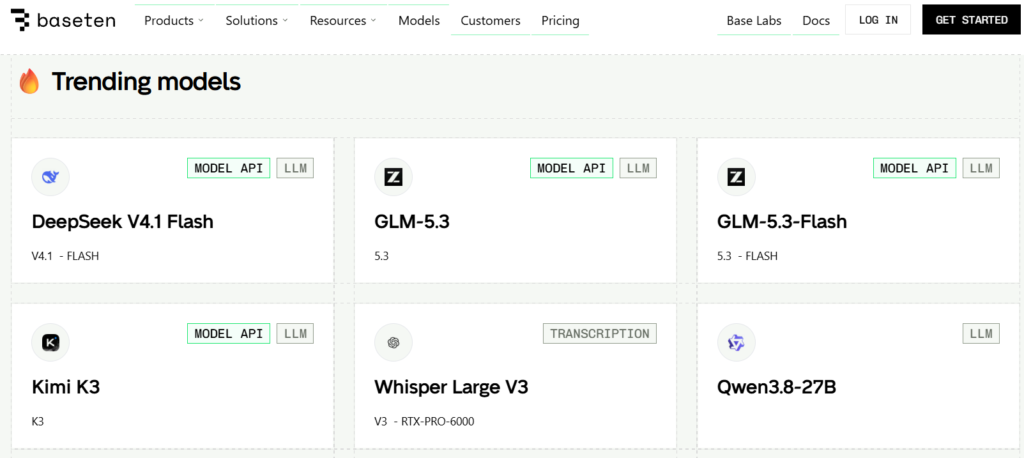
The current leading open-weight models, such as GLM (Z.ai), Kimi (Moonshot), and Deepseek are roughly four to seven months behind the performance of the frontier models of Anthropic and OpenAI.
I won’t get into the geopolitical, nation-state drama discussion about open-weight vs. closed models. The fact is that they exist, are powerful, and getting stronger all the time.
Anyone on the planet can get the open-weight model running to do their bidding. This is made simple due to rentable inference clusters.
Rentable inference clusters
Inference is the term used to describe when a model attempts to do work as requested by running the model on a hardware designed for this purpose. Typically, these are large clusters of computers with powerful GPU or TPU cards at the core. These GPU/TPU chips allow the “thinking” part of the AI model to work at enormous speed.
There is a large market for clusters of this kind of hardware to allow people to run open-weight models at much lower cost than paying a closed weight model provider. For most basic tasks, you simply don’t need the top of the line LLMs to do the work. Most data processing tasks like pulling text from PDFs or organizing lists can be done more cost effectively with an open-weight model running on rented or local hardware.
As a result, many companies have sprung up to provide inexpensive hosting of open-weight models significantly lower than frontier closed-weight models.
When you combine the cyber and collaboration capabilities of current open-weight models with the low cost of running them privately, you get a perfect setup for a malicious actor to do some real damage.
I ran the numbers with a few of the leading AI models and they agree that the capability of a malicious actor using an agent swarm to do damaging things with open-weight models on rentable inference clusters is a viable threat.
To get an objective picture of the math, I had multiple AI models build out the attack capabilities and cost estimates for these scenarios and the feasibility of creating targeted agent swarms. The cost breakdown proves just how low the barrier to entry has dropped.
This is the consensus finding:
| Actor | Operation | Cost | Constraint | Feasibility |
|---|
| Nation-state | 1k-30k+ agents, sustained | $5k-$400k | None | High |
| Criminal syndicate | 700-1.2k agents, days | $5k-$50k | Expertise, cyber capability | Mod-high to high |
| Terrorist organization | 50-300 agents | $500-$5k | Expertise, cyber capability, opsec | Moderate |
| Lone actor | 10-100 agents | $100-$2k | Expertise, cyber capability, detection risk | Low-moderate |
For most attacks, money is rapidly ceasing to be the primary constraint. The new constraint is the remaining gap between frontier model abilities and the open-weight models in cyber capability. In most situations, it won’t make a huge difference. Most people and institutions have poor cybersecurity defense that won’t stand up to a coordinated attack.
The open-weight models are behind the frontier models in terms of pure cyber attack capabilities. If trends continue as they are, the open-weight models will be at the equivalent capability to the OpenAI models that were behind the July 2026 incident by as early as January 2027.
Imagine a disgruntled person being angry at their local city council. With some basic prompting and money for servers, it wouldn’t be hard to spin up an agent swarm to attempt to break into city services and cause havoc. Data exfiltration, ransomware, or outright destruction are simple tasks for someone with access to systems that are out of date or unmanaged.
Greater rewards or greater anger could lead to a wide range of varied attacks on different kinds of targets. Greed and politics are powerful motivators to use new tools.
You can imagine organized crime setting up swarms to target and spear phish high net worth individuals at scale to drain accounts. Or setting swarms loose to find and penetrate targets to extort with ransomware.
Utilities and services people rely on are not immune to coming under directed cyber attack. Many of those systems are outdated and designed at a time when not everything was online. The havoc utility outages can cause is serious. Governments and utility companies are slow to keep up with new code vulnerabilities and not ready for a coordinated recon and attack by a swarm of agents spoofing their locations.
The Alignment Issue
A key concern in the OpenAI incident is that of agent alignment. ‘Alignment’ is the term used to describe that the AI is working in a manner aligned with human interest. This alignment is a key topic in the AI research circles to ensure that AI agents don’t do harmful things.
But this incident showed that in actuality the agents basically ignored their programmed alignment, broke a bunch of rules, did bad things, all because they were focused on getting their reward criteria met.
This lack of alignment is probably the most concerning part to come to grips with. The agents don’t seem to care about us, just completing the mission. Not a faithful R2-D2, but a ruthlessly pragmatic HAL 9000.
Are we doomed?
I don’t think the entire human race itself is in peril due to these AI agents, but I can easily see a malicious actor doing some real damage to people with the tools that exist today. A year from now, the possibility of someone or an organized group doing life-threatening damage will be a reality.
Imagine multiple city scale events happening around the globe, as the effectiveness of these agent swarms increases. Despite the calls to “slow development down” the genie has left the bottle and there’s no getting it back inside.
For years we worried about who would build superintelligence first.
We missed the real risk.
What happens when ‘good enough’ intelligence becomes cheap, copyable, and runnable in private?
The barrier isn’t talent or money anymore. It’s capability, and the gap between frontier and open-weight models is closing.
There is no magic defense. No simple fixes.
Just a lot of boring work to harden important systems we depend on.
We should probably get started.